Enjoy Music to the Fullest: 5 Online MP3 Tag Editors You Should Know About
Are you a music lover? Do you enjoy listening to your favourite songs as you work, study, or exercise? While music can bring us joy and relaxation, it's also essential to have a deeper understanding of the music we listen to. That's where ID3 tags come in.
ID3 tags are metadata in MP3 files that contain information about the music, such as its title, artist, album, and genre. These tags help us organize our music collection and understand the details of each song. But what if you want to update or change this information? That's where online MP3 tag editors come in. In this article, we'll introduce you to the 5 best online MP3 tag editors that you can use to enjoy your music collection fully
The Top 5 Online MP3 Tag Editors - Most Trusted
Music lovers come in two varieties: those who simply listen for pleasure, and those who collect music and meticulously catalogue it. MP3 files contain metadata, a set of information about the music file beyond its title. Have you heard that MP3 tagging is a lucrative business? Let's delve deeper into the topic and discover 5 top-notch online music tag editors.
TagMp3.Online
Tag MP3 Online is a powerful online MP3 tag editor that allows users to easily update and manage the metadata information of their audio files. This free website provides a convenient solution for those who want to change the tags, album art, and other ID3 information without having to download or install any software.
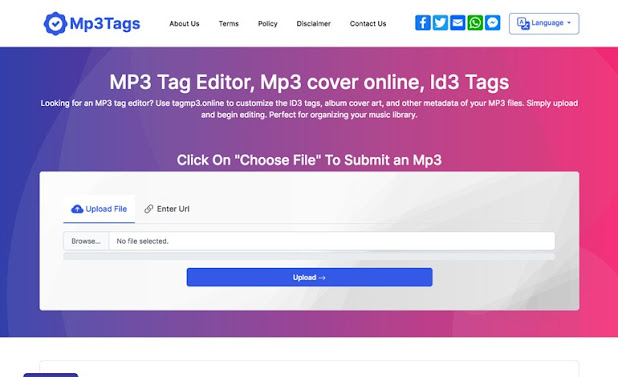
With its simple and intuitive interface, TagMP3.online makes it easy for anyone to edit their MP3 files, even if they have no prior technical knowledge. Users can upload their audio files from their hard drive or from an online database by entering its URL. The website automatically updates the ID3 version to ID3v2 for the MP3 files, ensuring compatibility with modern music players.

Tagmp3 online - CssLight
TagMP3.online also supports batch editing, allowing users to edit multiple MP3 files at once. This is a great time-saving feature for those who have a large collection of audio files that need to be updated. The website supports different file formats such as MP3, WMA, M4A, and more, providing users with the flexibility they need to manage their music library.
With its fast, efficient, and user-friendly design, TagMP3.online is an excellent online MP3 tag editor that is perfect for both personal and professional use. Whether you're a music enthusiast, a DJ, or a content creator, TagMP3.online is a great tool for keeping your audio files organized and up-to-date.
What is Tag Mp3 Online?
Tag Mp3 Online is a software tool or application that is used to fix corrupted or damaged MP3 files. MP3 files can become damaged or corrupted due to a variety of reasons such as file transfer errors, incorrect file conversion, or malware infections. Tag Mp3 Online tools work by analyzing the damaged MP3 file and repairing the errors in its structure, allowing the file to play correctly again.
How to Use Tag MP3 online?
Using TagMP3.online is very straightforward and simple. Here are the steps to follow:
Go to the website: Open your web browser and go to the TagMP3.online website.
Upload your MP3 file: You can upload your MP3 file either by clicking the "Choose File" button and selecting the file from your computer or by entering the URL of the file if it's located on an online database.
Edit the tags: Once your MP3 file is uploaded, you will be taken to the tag editor. Here, you can edit the metadata information, including the song title, artist, album, year, genre, and cover art.
Save changes: Once you have finished editing the tags, click the "Save" button to save the changes to your MP3 file.
Download the updated file: The updated MP3 file will be available for download immediately. Simply click the "Download" button to save the file to your computer.
That's all there is to it! With TagMP3.online, you can easily update and manage the metadata information of your MP3 files in just a few simple steps.
2. MP3Repair
MP3Repair is a tool or software designed to repair corrupted or damaged MP3 files. MP3 files can become damaged or corrupted for a variety of reasons, such as file transfer errors, incorrect file conversion, or malware infections. When this happens, the file may not play correctly or may produce unexpected results.
MP3Repair tools work by analyzing the damaged MP3 file and repairing the errors in its structure. This can help to restore the file to its original state, allowing it to play correctly again. Some MP3 repair tools also have additional features, such as the ability to recover missing or corrupted data or to fix other problems with the file, such as incorrect ID3 tags or incorrect header information.

Tag mp3
It's important to note that MP3Repair tools can't always recover all of the data from a damaged MP3 file. However, in many cases, they can significantly improve the file's quality and make it playable again. If you have a damaged MP3 file that you need to repair, consider using an MP3 repair tool to see if it can help.
Benefits of Using MP3 Repair
Restores damaged or corrupted MP3 files to their original state
Improves the quality and playability of the file
Can recover missing or corrupted data
Can fix other problems with the file, such as incorrect ID3 tags or incorrect header information
In conclusion, MP3 Repair is a valuable tool for anyone who has experienced problems with their MP3 files. Whether you need to fix a damaged file or recover missing data, MP3 Repair can help.
3. Watermark Images
Watermark Images is a website that offers a range of tools for watermarking images and editing MP3 tags. One of its features is the MP3 Tag Editor online, which is a web-based tool for editing the metadata or "tags" of MP3 files.
MP3 tags contain important information about the audio file, such as the title, artist, album, and genre. The MP3 Tag Editor online allows users to edit this information and keep their audio files organized and correctly labelled. With its user-friendly interface, users can easily make changes to the MP3 tags, such as updating the artist name or album title.
In addition to its MP3 Tag Editor, Watermark Images also offers other tools for watermarking images, including a batch watermark tool for adding a watermark to multiple images at once, and a photo watermark software for adding a watermark to images on a desktop computer.

mp3 tag
Whether you need to edit the tags of your MP3 files or protect your images with a watermark, Watermark Images offers a variety of tools to help. With its easy-to-use interface and range of features, it's a great resource for anyone looking to manage their digital media.
Features of the MP3 Tag Editor online
The MP3 Tag Editor online on Watermark Images offers several useful features for editing MP3 tags:
User-Friendly Interface: The MP3 Tag Editor has a simple and straightforward interface, making it easy for users to navigate and make changes to their MP3 tags.
Batch Editing: Users can edit the tags of multiple MP3 files at once, saving time and effort compared to editing each file individually.
ID3 Tag Support: The MP3 Tag Editor supports ID3 tags, which are the standard format for MP3 metadata. This means that users can be sure that the tags they edit will be compatible with a wide range of media players.
Online Access: The MP3 Tag Editor is a web-based tool, which means that users can access it from any device with an internet connection, without the need for additional software or applications.
Multiple Languages: The MP3 Tag Editor supports multiple languages, making it accessible to a wide range of users around the world.
By offering these features, the MP3 Tag Editor on Watermark Images makes it easier for users to manage and organize their audio files, ensuring that their music library is always up-to-date and accurately labelled.
4. MP3 ID3 Tag Editor
An MP3 ID3 tag editor is a software or online tool that allows you to edit the metadata information, also known as ID3 tags, of your MP3 files. ID3 tags contain information such as the song title, artist, album, year of release, and genre. With an MP3 ID3 tag editor, you can add missing information, correct errors, or customize your music library to suit your preferences.
Some popular MP3 ID3 tag editors include MP3Tag, MusicBrainz Picard, and ID3.org. These editors often have features such as batch processing, which allows you to edit multiple files at once, and automatic tag retrieval, which uses online databases to fill in the missing information.

tag mp3
Using an MP3 ID3 tag editor can help you organize and manage your music collection more efficiently. It also ensures that your music files have accurate and complete metadata, making it easier to search and sort your music library.
Benefits of using an MP3 ID3 Tag Editor
Accurately Labeled Music Library: An MP3 ID3 Tag Editor allows users to accurately label their music files, ensuring that their library is organized and up-to-date.
Consistent Information: By editing the ID3 tags, users can ensure that the information displayed for their audio files is consistent across all media players.
Easy Library Management: With an MP3 ID3 Tag Editor, users can quickly and easily manage their music library, updating information and fixing incorrect tags with just a few clicks.
Batch Editing: Many MP3 ID3 Tag Editors offer batch editing capabilities, allowing users to make changes to multiple files at once, saving time and effort.
Improved Music Experience: With correctly labelled audio files, users can easily find the music they want to listen to, improving their overall music experience.
By using an MP3 ID3 Tag Editor, users can improve the organization and accuracy of their music library, making it easier to manage and enjoy their music collection.
5. Mp3Tag
Mp3tag is a popular MP3 ID3 Tag Editor for Windows. It allows users to edit the metadata or "tags" of their MP3 files, including the title, artist, album, and genre. Mp3tag supports a wide range of audio formats, including MP3, FLAC, AAC, and many more, making it a versatile tool for managing your music library.
One of the key features of Mp3tag is its support for batch editing, which allows users to make changes to multiple files at once. This is especially useful for those who have a large music library and want to quickly update information or fix incorrect tags.

Mp3tag also provides advanced options for renaming and restructuring your audio files based on the information stored in their ID3 tags. This makes it easy to keep your music library organized and up-to-date, even as you add new files.
In addition to its core tagging features, Mp3tag also includes a range of tools for organizing and managing your music library. These include a built-in file explorer, support for custom scripting, and the ability to export and import tag information.
Features of Mp3tag
Supports a wide range of audio formats: Mp3tag supports MP3, FLAC, AAC, and many more audio formats, making it a versatile tool for managing your music library.
Batch editing capabilities: With Mp3tag, users can make changes to multiple files at once, saving time and effort.
Advanced options for renaming and restructuring: Mp3tag provides advanced options for renaming and restructuring your audio files based on the information stored in their ID3 tags.
Built-in file explorer: Mp3tag includes a built-in file explorer that makes it easy to manage your music library.
Custom scripting support: Mp3tag provides support for custom scripting, allowing users to automate and streamline their work.
Export and import tag information: Mp3tag allows users to export and import tag information, making it easy to share information between different devices.
Mp3tag is a feature-rich MP3 ID3 Tag Editor that provides a wide range of tools for managing your music library. Whether you're looking to update information in your tags, rename files, or organize your music collection, Mp3tag has you covered.
ID3 tags are metadata in MP3 files that contain information about the music, such as its title, artist, album, and genre. These tags help us organize our music collection and understand the details of each song. But what if you want to update or change this information? That's where online MP3 tag editors come in. In this article, we'll introduce you to the 5 best online MP3 tag editors that you can use to enjoy your music collection fully
The Top 5 Online MP3 Tag Editors - Most Trusted
Music lovers come in two varieties: those who simply listen for pleasure, and those who collect music and meticulously catalogue it. MP3 files contain metadata, a set of information about the music file beyond its title. Have you heard that MP3 tagging is a lucrative business? Let's delve deeper into the topic and discover 5 top-notch online music tag editors.
TagMp3.Online
Tag MP3 Online is a powerful online MP3 tag editor that allows users to easily update and manage the metadata information of their audio files. This free website provides a convenient solution for those who want to change the tags, album art, and other ID3 information without having to download or install any software.
With its simple and intuitive interface, TagMP3.online makes it easy for anyone to edit their MP3 files, even if they have no prior technical knowledge. Users can upload their audio files from their hard drive or from an online database by entering its URL. The website automatically updates the ID3 version to ID3v2 for the MP3 files, ensuring compatibility with modern music players.
Tagmp3 online - CssLight
TagMP3.online also supports batch editing, allowing users to edit multiple MP3 files at once. This is a great time-saving feature for those who have a large collection of audio files that need to be updated. The website supports different file formats such as MP3, WMA, M4A, and more, providing users with the flexibility they need to manage their music library.
With its fast, efficient, and user-friendly design, TagMP3.online is an excellent online MP3 tag editor that is perfect for both personal and professional use. Whether you're a music enthusiast, a DJ, or a content creator, TagMP3.online is a great tool for keeping your audio files organized and up-to-date.
What is Tag Mp3 Online?
Tag Mp3 Online is a software tool or application that is used to fix corrupted or damaged MP3 files. MP3 files can become damaged or corrupted due to a variety of reasons such as file transfer errors, incorrect file conversion, or malware infections. Tag Mp3 Online tools work by analyzing the damaged MP3 file and repairing the errors in its structure, allowing the file to play correctly again.
How to Use Tag MP3 online?
Using TagMP3.online is very straightforward and simple. Here are the steps to follow:
Go to the website: Open your web browser and go to the TagMP3.online website.
Upload your MP3 file: You can upload your MP3 file either by clicking the "Choose File" button and selecting the file from your computer or by entering the URL of the file if it's located on an online database.
Edit the tags: Once your MP3 file is uploaded, you will be taken to the tag editor. Here, you can edit the metadata information, including the song title, artist, album, year, genre, and cover art.
Save changes: Once you have finished editing the tags, click the "Save" button to save the changes to your MP3 file.
Download the updated file: The updated MP3 file will be available for download immediately. Simply click the "Download" button to save the file to your computer.
That's all there is to it! With TagMP3.online, you can easily update and manage the metadata information of your MP3 files in just a few simple steps.
2. MP3Repair
MP3Repair is a tool or software designed to repair corrupted or damaged MP3 files. MP3 files can become damaged or corrupted for a variety of reasons, such as file transfer errors, incorrect file conversion, or malware infections. When this happens, the file may not play correctly or may produce unexpected results.
MP3Repair tools work by analyzing the damaged MP3 file and repairing the errors in its structure. This can help to restore the file to its original state, allowing it to play correctly again. Some MP3 repair tools also have additional features, such as the ability to recover missing or corrupted data or to fix other problems with the file, such as incorrect ID3 tags or incorrect header information.
Tag mp3
It's important to note that MP3Repair tools can't always recover all of the data from a damaged MP3 file. However, in many cases, they can significantly improve the file's quality and make it playable again. If you have a damaged MP3 file that you need to repair, consider using an MP3 repair tool to see if it can help.
Benefits of Using MP3 Repair
Restores damaged or corrupted MP3 files to their original state
Improves the quality and playability of the file
Can recover missing or corrupted data
Can fix other problems with the file, such as incorrect ID3 tags or incorrect header information
In conclusion, MP3 Repair is a valuable tool for anyone who has experienced problems with their MP3 files. Whether you need to fix a damaged file or recover missing data, MP3 Repair can help.
3. Watermark Images
Watermark Images is a website that offers a range of tools for watermarking images and editing MP3 tags. One of its features is the MP3 Tag Editor online, which is a web-based tool for editing the metadata or "tags" of MP3 files.
MP3 tags contain important information about the audio file, such as the title, artist, album, and genre. The MP3 Tag Editor online allows users to edit this information and keep their audio files organized and correctly labelled. With its user-friendly interface, users can easily make changes to the MP3 tags, such as updating the artist name or album title.
In addition to its MP3 Tag Editor, Watermark Images also offers other tools for watermarking images, including a batch watermark tool for adding a watermark to multiple images at once, and a photo watermark software for adding a watermark to images on a desktop computer.
mp3 tag
Whether you need to edit the tags of your MP3 files or protect your images with a watermark, Watermark Images offers a variety of tools to help. With its easy-to-use interface and range of features, it's a great resource for anyone looking to manage their digital media.
Features of the MP3 Tag Editor online
The MP3 Tag Editor online on Watermark Images offers several useful features for editing MP3 tags:
User-Friendly Interface: The MP3 Tag Editor has a simple and straightforward interface, making it easy for users to navigate and make changes to their MP3 tags.
Batch Editing: Users can edit the tags of multiple MP3 files at once, saving time and effort compared to editing each file individually.
ID3 Tag Support: The MP3 Tag Editor supports ID3 tags, which are the standard format for MP3 metadata. This means that users can be sure that the tags they edit will be compatible with a wide range of media players.
Online Access: The MP3 Tag Editor is a web-based tool, which means that users can access it from any device with an internet connection, without the need for additional software or applications.
Multiple Languages: The MP3 Tag Editor supports multiple languages, making it accessible to a wide range of users around the world.
By offering these features, the MP3 Tag Editor on Watermark Images makes it easier for users to manage and organize their audio files, ensuring that their music library is always up-to-date and accurately labelled.
4. MP3 ID3 Tag Editor
An MP3 ID3 tag editor is a software or online tool that allows you to edit the metadata information, also known as ID3 tags, of your MP3 files. ID3 tags contain information such as the song title, artist, album, year of release, and genre. With an MP3 ID3 tag editor, you can add missing information, correct errors, or customize your music library to suit your preferences.
Some popular MP3 ID3 tag editors include MP3Tag, MusicBrainz Picard, and ID3.org. These editors often have features such as batch processing, which allows you to edit multiple files at once, and automatic tag retrieval, which uses online databases to fill in the missing information.
tag mp3
Using an MP3 ID3 tag editor can help you organize and manage your music collection more efficiently. It also ensures that your music files have accurate and complete metadata, making it easier to search and sort your music library.
Benefits of using an MP3 ID3 Tag Editor
Accurately Labeled Music Library: An MP3 ID3 Tag Editor allows users to accurately label their music files, ensuring that their library is organized and up-to-date.
Consistent Information: By editing the ID3 tags, users can ensure that the information displayed for their audio files is consistent across all media players.
Easy Library Management: With an MP3 ID3 Tag Editor, users can quickly and easily manage their music library, updating information and fixing incorrect tags with just a few clicks.
Batch Editing: Many MP3 ID3 Tag Editors offer batch editing capabilities, allowing users to make changes to multiple files at once, saving time and effort.
Improved Music Experience: With correctly labelled audio files, users can easily find the music they want to listen to, improving their overall music experience.
By using an MP3 ID3 Tag Editor, users can improve the organization and accuracy of their music library, making it easier to manage and enjoy their music collection.
5. Mp3Tag
Mp3tag is a popular MP3 ID3 Tag Editor for Windows. It allows users to edit the metadata or "tags" of their MP3 files, including the title, artist, album, and genre. Mp3tag supports a wide range of audio formats, including MP3, FLAC, AAC, and many more, making it a versatile tool for managing your music library.
One of the key features of Mp3tag is its support for batch editing, which allows users to make changes to multiple files at once. This is especially useful for those who have a large music library and want to quickly update information or fix incorrect tags.
Mp3tag also provides advanced options for renaming and restructuring your audio files based on the information stored in their ID3 tags. This makes it easy to keep your music library organized and up-to-date, even as you add new files.
In addition to its core tagging features, Mp3tag also includes a range of tools for organizing and managing your music library. These include a built-in file explorer, support for custom scripting, and the ability to export and import tag information.
Features of Mp3tag
Supports a wide range of audio formats: Mp3tag supports MP3, FLAC, AAC, and many more audio formats, making it a versatile tool for managing your music library.
Batch editing capabilities: With Mp3tag, users can make changes to multiple files at once, saving time and effort.
Advanced options for renaming and restructuring: Mp3tag provides advanced options for renaming and restructuring your audio files based on the information stored in their ID3 tags.
Built-in file explorer: Mp3tag includes a built-in file explorer that makes it easy to manage your music library.
Custom scripting support: Mp3tag provides support for custom scripting, allowing users to automate and streamline their work.
Export and import tag information: Mp3tag allows users to export and import tag information, making it easy to share information between different devices.
Mp3tag is a feature-rich MP3 ID3 Tag Editor that provides a wide range of tools for managing your music library. Whether you're looking to update information in your tags, rename files, or organize your music collection, Mp3tag has you covered.

Comments
Post a Comment